
Cobra Driver Settings: FutureFit33 Is a Compass, Not a Grid
Cobra's current hosel is FutureFit33, not MyFly. Its letter-and-number codes give 33 loft and lie settings, and the chart reads outward from A1 like a compass.
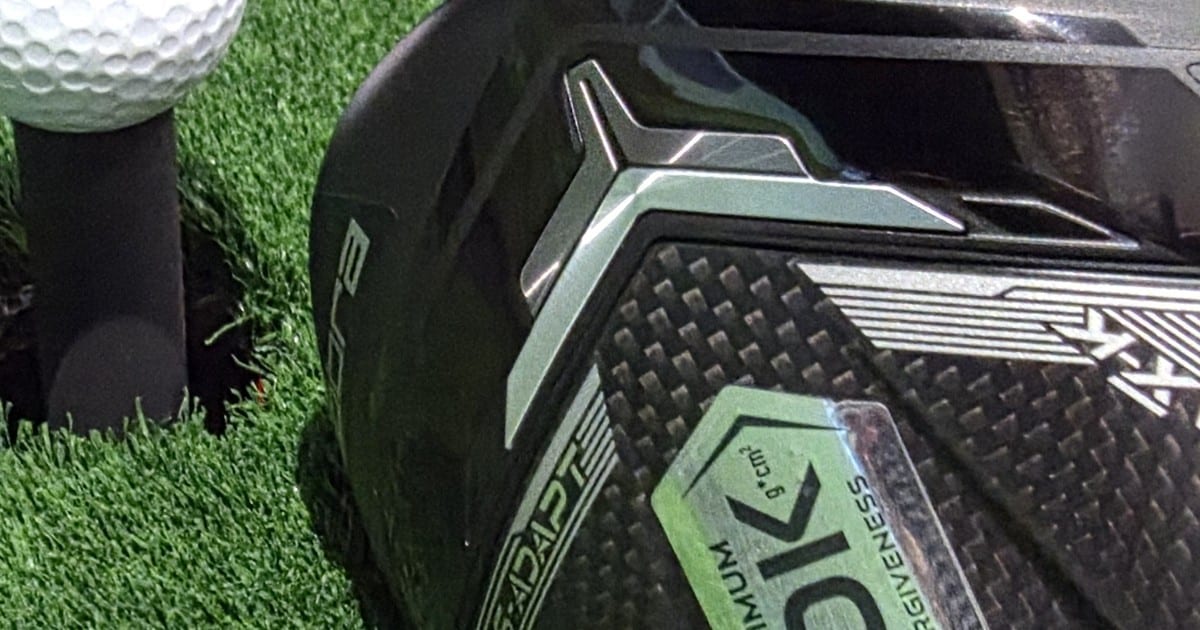
My driver head is stamped 9.0 degrees. Beside that stamp sit a QR code and four characters: FF33. The hosel is the joint where the shaft meets the head, and it holds the sleeve, the collar you actually turn with a wrench.
That stamp is where looking this up goes wrong. FF33 is short for FutureFit33, the system Cobra uses now. My top result on 2026-09-22 was golfhubz, a third-party guide to Cobra’s older MyFly hosel. It was updated eight days earlier, calls LTDx, Aerojet and Darkspeed current, and never names FutureFit33.
So a fresh-looking guide walks you to a sleeve your club doesn’t have. Here’s what’s on yours, and how to read 33 settings without memorizing one.
The short answer
- Look for
FF33beside the hosel. That’s FutureFit33, and it’s on the 2025 DS-ADAPT and the 2026 OPTM drivers.- Every setting is a letter plus a number, like the A1 and B2 on my own sleeve. The 64 combinations resolve to “33 unique loft & lie settings” (COBRA, retrieved 2026-09-22).
- Loft and lie each reach 2 degrees either way, measured out from A1 at the center.
- Don’t read it as a list of 33. Eight highlighted cells sit at eight compass points, so pick a direction first.
- Lie is the only lever the hosel gives you on curve, and it reduces curve rather than setting a bias. A draw or fade bias comes from a sole weight, which is fixed in place on the MAX-K and the MAX-D.
- The wrench is a T25, and Cobra publishes no torque figure at all.
In this article:
- Look for FF33 before you trust any Cobra chart
- A1 sits at the center, and eight cells are the compass points
- Pick a direction, then pick how far along the spoke
- Shot shape bias lives on the sole, not in the hosel
- Changing the setting takes a T25 wrench and 5 to 10 shots
- Terms in this article
Look for FF33 before you trust any Cobra chart
The stamp settles it faster than matching model names. If the area around your hosel reads FF33, the chart below is yours. If not, these codes won’t match anything printed on your sleeve.
Cobra’s own page gives the spec: 64 letter and number combinations, resolving to “33 unique loft & lie settings” (COBRA, retrieved 2026-09-22). Loft reaches 2 degrees either way, and so does lie.
Two words carry the rest of this. Loft is the angle of the clubface, which mostly sets how high the ball launches and how much it spins. Lie is the angle between the shaft and the ground with the club soled flat.
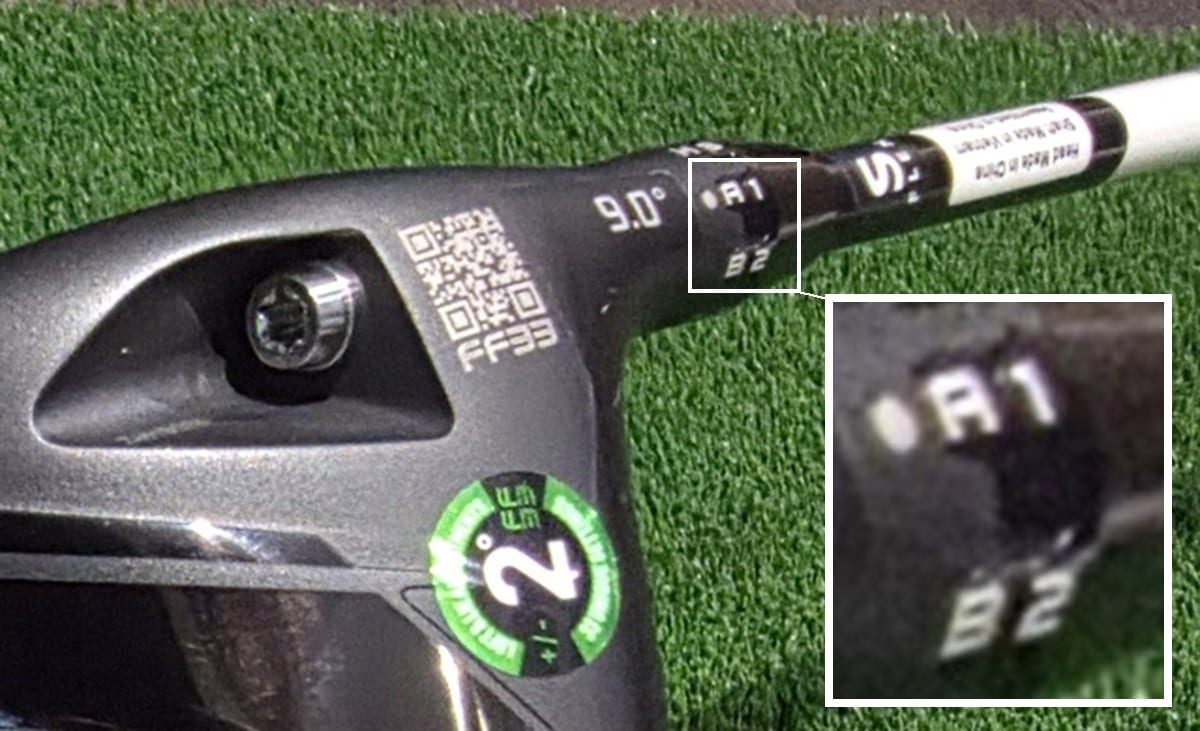
Notice where the loft number lives. It’s stamped on the head. The sleeve will never tell you which way adds loft.
What the sleeve does carry is codes, each one a letter over a number. That’s the shape of every setting in this system, a letter and a number rather than a degree figure.
Two generations share this hosel. The 2026 OPTM line is LS, X, MAX-K and MAX-D, and the MAX-D lists at $599 (COBRA, retrieved 2026-09-22). Cobra still sells the 2025 DS-ADAPT, which is the club in the photograph above.
Parts sellers treat the FutureFit33 sleeve as one component across both generations. That’s the aftermarket’s practice, not a Cobra statement, so have a fitter confirm before you buy a shaft on it.
Does the printed number match what a machine measures? That’s a separate question: what a loft sleeve actually moves.
A1 sits at the center, and eight cells are the compass points
Thirty-three is only frightening if you read the chart as a list. A1 sits in the middle, and gray spokes run out from it to eight highlighted cells.
Those eight are the compass points. Up the page is more loft and down is less. Left is upright, which stands the shaft more vertical and tends to send a right-hander’s ball further left. Right is flat, which does the opposite.
Cobra prints LEFT and RIGHT at the ends of that axis, so the chart names the outcome for you.
| Direction | Setting | What you get |
|---|---|---|
| Up | C7 | +2.0° loft, standard lie |
| Upper right | B6 | +1.4° loft, 1.4° flat |
| Right | A5 | Standard loft, 2.0° flat |
| Lower right | H4 | -1.4° loft, 1.4° flat |
| Down | G3 | -2.0° loft, standard lie |
| Lower left | F2 | -1.4° loft, 1.4° upright |
| Left | E1 | Standard loft, 2.0° upright |
| Upper left | D8 | +1.4° loft, 1.4° upright |
| Center | A1 | Standard loft, standard lie |
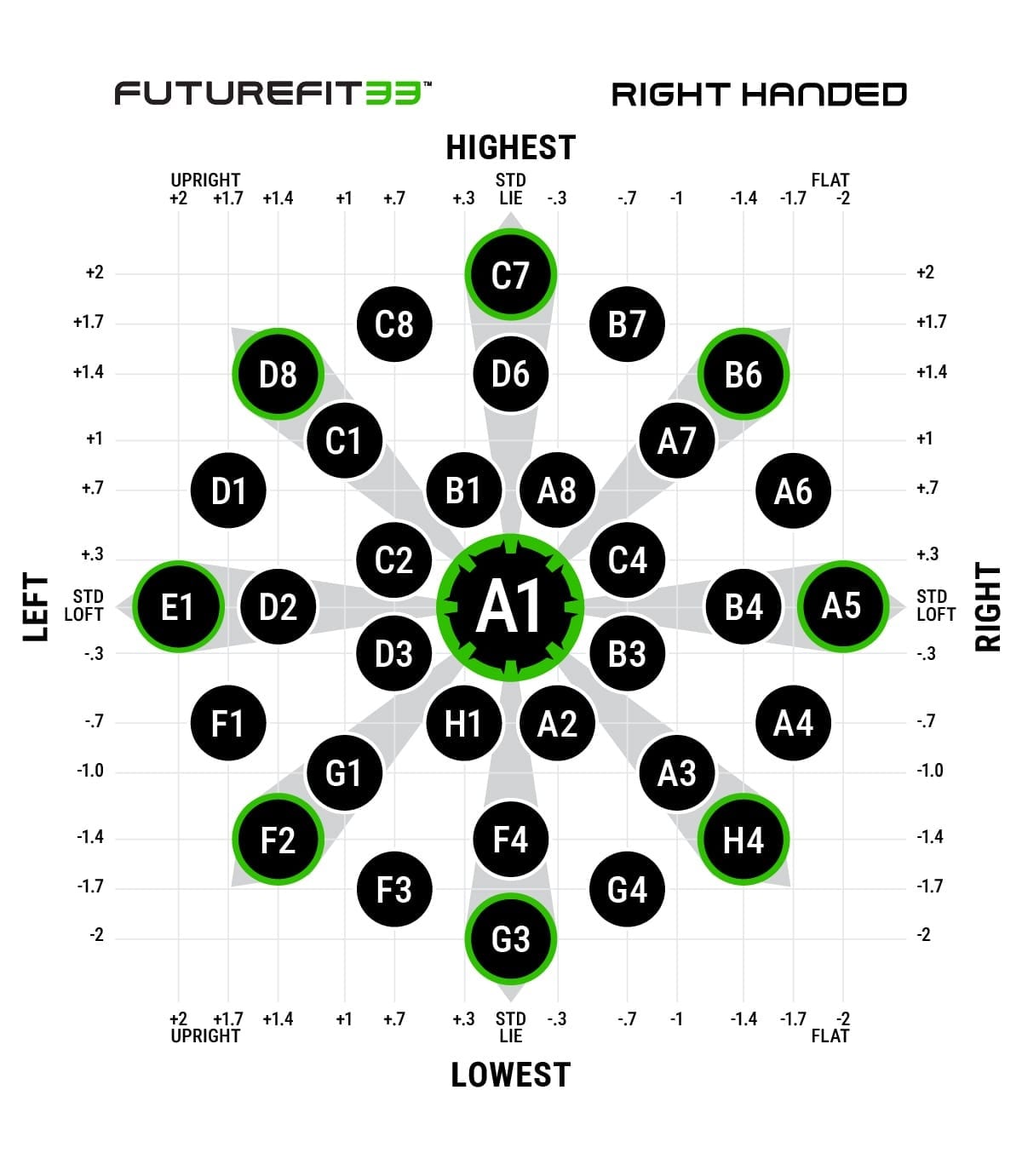
Counting off the chart, the letters run A through H and the numbers 1 through 8. That’s 64 combinations for 33 cells, so a cell can answer to more than one code. The sleeve in the photograph above carries two of them, A1 and B2, and both resolve to the same cell.
The arithmetic behind that is mine, not Cobra’s. Each letter is a circle of radius 1 on the chart, and each number is a clock position around it. The circles overlap, so one cell can take several addresses.
Dead center takes eight: A1, B2, C3, D4, E5, F6, G7 and H8, every code whose number matches its letter’s place in the alphabet. The eight compass points are the opposite case, with one address each. A code that isn’t printed on the chart isn’t missing, just sharing a cell with the code Cobra did print.
For scale, Titleist’s SureFit hosel has 16 addresses in a four by four grid: what each SureFit code means. Cobra has 64 addresses for 33 outcomes, the most abstract labeling of the five brand hosels I’ve worked through.
Two of the others sit at the plain end. PING lets the size of a mark carry the number, then gives you a three-column table of loft and lie. TaylorMade prints the degrees themselves at each position on its clock face, loft and face angle and lie together.
Pick a direction, then pick how far along the spoke
This is the part to save to your phone. Pick a direction, then pick how far out along the spoke to go.
Loft change runs down the left. Within each row, the settings sit the way Cobra orders them: most upright on the left, most flat on the right.
| Loft | Settings, most upright on the left to most flat on the right |
|---|---|
| +2.0° | C7 (standard lie) |
| +1.7° | C8 (0.7 up) · B7 (0.7 flat) |
| +1.4° | D8 (1.4 up) · D6 (standard) · B6 (1.4 flat) |
| +1.0° | C1 (1.0 up) · A7 (1.0 flat) |
| +0.7° | D1 (1.7 up) · B1 (0.3 up) · A8 (0.3 flat) · A6 (1.7 flat) |
| +0.3° | C2 (0.7 up) · C4 (0.7 flat) |
| Standard | E1 (2.0 up) · D2 (1.4 up) · A1 (standard) · B4 (1.4 flat) · A5 (2.0 flat) |
| -0.3° | D3 (0.7 up) · B3 (0.7 flat) |
| -0.7° | F1 (1.7 up) · H1 (0.3 up) · A2 (0.3 flat) · A4 (1.7 flat) |
| -1.0° | G1 (1.0 up) · A3 (1.0 flat) |
| -1.4° | F2 (1.4 up) · F4 (standard) · H4 (1.4 flat) |
| -1.7° | F3 (0.7 up) · G4 (0.7 flat) |
| -2.0° | G3 (standard lie) |
Values read off Cobra’s official right-handed chart (COBRA, retrieved 2026-09-22). Add the rows and they come to 33, and the top half mirrors the bottom half.
I read every cell off that chart image myself. BagSpec’s reprint put F4 at a flat lie, where Cobra’s chart has it at standard.
For a right-hander, a draw curves the ball left and a fade curves it right. A slice is an oversized fade, a hook an oversized draw. So four common misses become four directions:
- The ball won’t climb. Go up, toward C7.
- The ball balloons and spins. Go down, toward G3.
- The ball curves right. Go left, toward E1.
- The ball hooks left. Go right, toward A5.
Two caveats, and both are about you. Going left won’t delete your slice. It reduces how far the ball curves, and your swing still starts the curve. Move diagonally and you’ve changed two things at once.
There’s also a shortcut Cobra built into the club, and I haven’t seen another guide mention it. Plugged In Golf reports that the QR code beside the hosel, the one in the photograph above, opens Cobra’s FutureFit33 fitting tool. You mark where your shots are missing and it hands back a loft and lie.
You don’t have to work through 33 settings either, and a Cobra vice president said so: “Once you find out what quadrant you’re missing in, you go with the opposite quadrant… you’re only going to need to try maybe two to three, maybe four settings at the most” (GOLF.com, 2024-12-25).
Thirty-three settings exist. Four is the most you’re expected to try.
Shot shape bias lives on the sole, not in the hosel
A draw or fade bias comes from a weight in the sole, not from the hosel. Lie is the only lever the hosel gives you on curve, and it reduces curve rather than setting a bias. How much say you get over bias depends on which model you bought.
| Model | Sole weights |
|---|---|
| OPTM LS | Three ports, with 11, 7 and 3 gram weights |
| OPTM X | Two ports, with 11 and 3 gram weights |
| OPTM MAX-K | One 11 gram weight at the back, fixed |
| OPTM MAX-D | One 11 gram weight in the heel, fixed |
Weights as listed in Cobra’s driver adjustment guide (COBRA, retrieved 2026-09-22). That table is the 2026 OPTM line. The 2025 DS-ADAPT isn’t in it, so DS-ADAPT owners like me can’t read their weight layout off these rows.
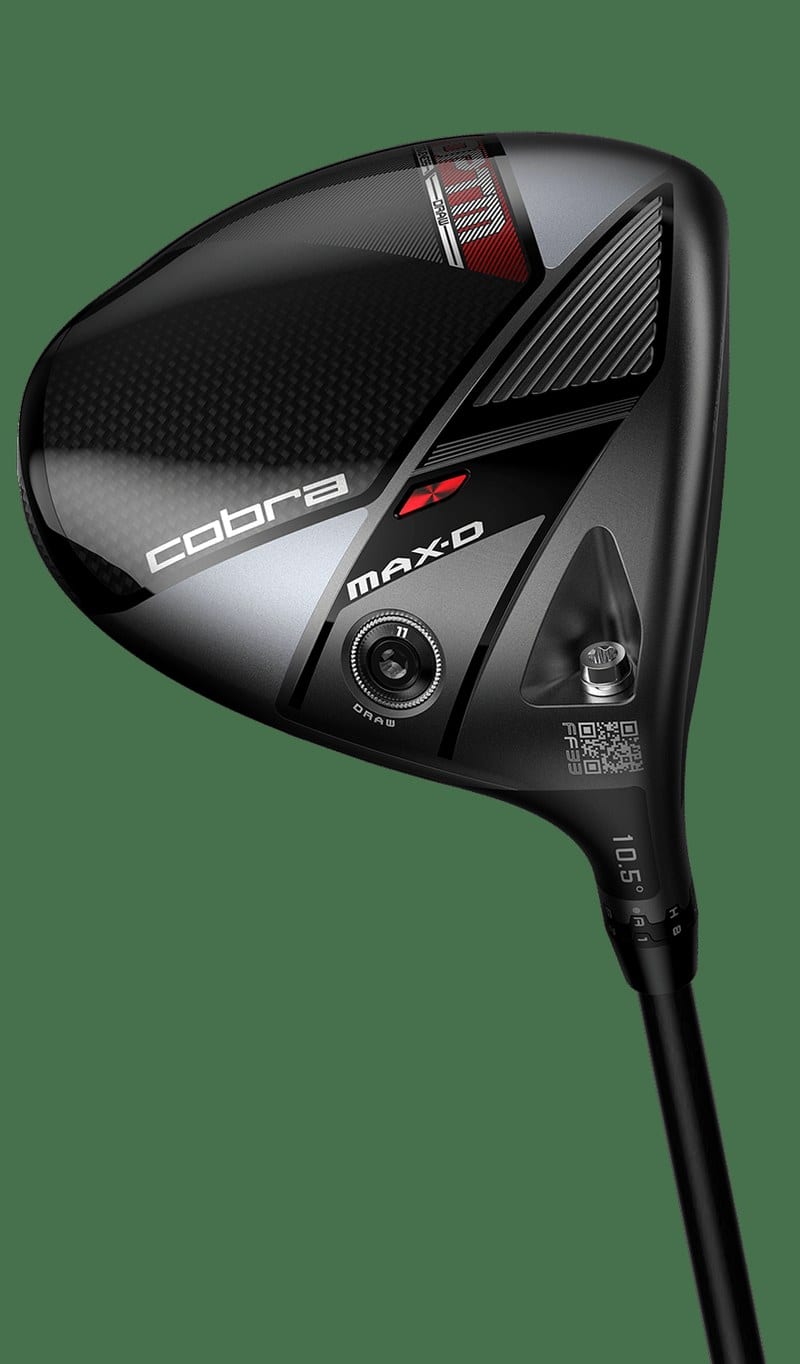
On the MAX-K and the MAX-D there’s nothing to move, so on those two the model choice is the shot shape choice. Cobra sells the MAX-D on that basis: “Eliminate your slice with draw-biased weighting” (COBRA, retrieved 2026-09-22).
On the X you do have a choice. Plugged In Golf found that moving the heavier weight out to the toe pushes flight toward a fade.
One thing to expect at address: adding loft makes the face look more closed, even with Cobra’s SmartPad sole (Plugged In Golf). SmartPad is Cobra’s name for a shaped sole, meant to keep the face square when you set the club down. That’s a look, not a measurement, and the loft sleeve article is where the measuring happens.
Other brands split these two jobs differently, which is why the answer changes on a different driver. Callaway’s OptiFit hosel is the clearest contrast: what each OptiFit setting fixes.
Changing the setting takes a T25 wrench and 5 to 10 shots
Cobra’s one instruction here is about testing. Its guide says to start at A1 and hit 5 to 10 shots before changing anything (COBRA, retrieved 2026-09-22). That gives you something to compare against.
The tool is a T25. Torx is a six-pointed star screw head, T25 is its size, and torque is how hard you twist. Cobra’s own wrench listing points to any T25 torque wrench, so a plain T25 Torx driver seats in the screw.
What Cobra doesn’t give is a torque number. You’ll find one quoted online as though it were a specification. It isn’t Cobra’s, and I couldn’t find a published figure anywhere on Cobra’s pages.
The turning itself is generic, so this is a general procedure rather than Cobra’s. You loosen the hosel screw until the head has play, leaving the screw in place. Then you seat the sleeve where you want it and tighten back down.
The step people skip is writing the code down. A setting you can’t name is one you can’t get back to.
One rules point before you tee off. You can’t adjust a club during a round: Rule 4.1a covers deliberately changing a club’s performance characteristics while you’re playing. So this is a range job.
The one action worth taking from all this is pointing your phone at the QR code beside your hosel. Plugged In Golf reports it opens the tool Cobra built for this question. No QR code and no FF33 stamp means a different system, and that’s the first thing to find out.
Terms in this article
- Hosel: the joint where the shaft meets the clubhead. On an adjustable driver it’s what holds the sleeve.
- Sleeve: the collar between the shaft and the head. It carries the letter and number codes, and turning it is what changes the setting.
- Loft: the angle of the clubface, which mostly sets how high the ball launches and how much it spins. On these drivers it’s stamped on the head.
- Lie angle: the angle between the shaft and the ground with the club soled flat.
- Upright and flat: the two directions lie angle moves. Upright stands the shaft more vertical and tends to send a right-hander’s ball further left, and flat does the opposite.
- Draw and fade: for a right-hander, a draw curves the ball left and a fade curves it right. A hook is an oversized draw, a slice an oversized fade.
- Sole weight: a weighted screw set into the bottom of the head. Moving it toward the heel or the toe bends ball flight sideways, and on some Cobra models it doesn’t move at all.
- SmartPad: Cobra’s name for a shaped sole, meant to keep the face square when you set the club down.
- Torx, T25 and torque: Torx is a six-pointed star screw head, T25 is its size, and torque is how hard you twist. The sleeve screw on these drivers takes a T25.